로또 번호 생성기
많은 분들이 궁금해하시고 직접 만들어보고 싶어 하시는 '로또 번호 생성기' 프로그램 예제 소스를 공유합니다. 프로그래밍 초보자분들도 쉽게 따라 할 수 있도록 핵심 기능만 담았습니다.
아래에서는 완성된 예제 소스 코드를 바로 확인하실 수 있습니다. 코드에 대한 자세한 설명이나 작동 방식이 궁금하시다면, 하단에 안내된 유튜브 강의를 참고해주세요!
개발환경
1) OS
macOS Sequoia (15.5)
개발환경이 맥일뿐. 소스 코드는 윈도우에서 실행 됩니다.
2) Tool
Visual Studio Code, Excel
3) Python Version
3.13.0
4) ETC
과거 로또 당첨번호 엑셀파일
최신 파일은 동행복권 사이트(https://dhlottery.co.kr/gameResult.do?method=byWin)에서 다운로드 할 수 있습니다.
파일구조
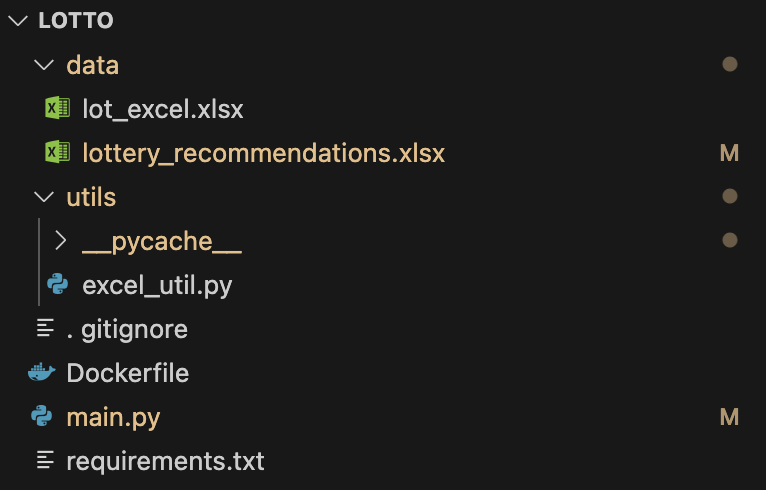
프로그램 실행에 필요한 파일은 3개만 있으면 됩니다.
data / lot_excel.xlsx
utils / excel_util.py
main.py
다른 파일들은 이번 강의에서는 필요 없으니 참고 하세요. 파이썬 프로그램 예제는 코드 영역에 있으니 복붙해서 사용하시면 편하십니다.
소스 코드
1) main.py
# main.py

import pandas as pd
import random
import os
from typing import List, Tuple
from utils.excel_util import ExcelUtils  # 엑셀 유틸리티 모듈 임포트


def generate_lottery_numbers() -> List[int]:
    """
    1부터 45 사이의 6개 로또 번호를 무작위로 생성하는 함수

    Returns:
        정렬된 6개의 무작위 번호 리스트
    """
    return sorted(random.sample(range(1, 46), 6))


def is_valid_sum(numbers: List[int], min_sum: int = 48, max_sum: int = 240) -> bool:
    """
    번호들의 합이 유효한 범위 내에 있는지 확인하는 함수

    Args:
        numbers: 로또 번호 리스트
        min_sum: 허용 가능한 최소 합계
        max_sum: 허용 가능한 최대 합계

    Returns:
        합계가 유효하면 True, 아니면 False
    """
    total = sum(numbers)
    return min_sum <= total <= max_sum


def is_unique_combination(lotto_numbers: List[int], past_numbers_df: pd.DataFrame) -> Tuple[bool, int]:
    """
    생성된 조합이 과거 당첨 번호에 없는 고유한 조합인지 확인하는 함수

    Args:
        lotto_numbers: 생성된 로또 번호
        past_numbers_df: 과거 당첨 번호가 포함된 DataFrame

    Returns:
        (고유성 여부, 비교 횟수) 튜플
    """
    comparisons = 0

    for row in zip(past_numbers_df[1], past_numbers_df[2], past_numbers_df[3],
                  past_numbers_df[4], past_numbers_df[5], past_numbers_df[6]):
        comparisons += 1

        # 일치하는 번호 개수 세기
        matches = sum(1 for num in row if num in lotto_numbers)

        if matches >= 6:  # 과거 당첨 조합과 정확히 일치
            return False, comparisons

    return True, comparisons


def generate_recommendations(num_recommendations: int = 5) -> List[List[int]]:
    """
    추천 로또 번호 조합을 생성하는 함수

    Args:
        num_recommendations: 생성할 추천 조합 개수

    Returns:
        추천 로또 번호 조합 리스트
    """
    # 파일 경로 가져오기
    current_dir = os.getcwd()
    file_path = os.path.join(current_dir, 'data', 'lot_excel.xlsx')

    # 과거 당첨 번호 불러오기 (엑셀 유틸리티 사용)
    try:
        past_numbers_df = ExcelUtils.read_excel(
            file_path=file_path,
            sheet_name='excel',
            usecols='N:S',
            skiprows=2
        )
    except Exception as e:
        print(f"당첨 번호 파일 로딩 중 오류: {e}")
        raise

    recommendations = []
    attempts = 0
    max_attempts = 10000  # 안전 제한 횟수

    while len(recommendations) < num_recommendations and attempts < max_attempts:
        attempts += 1

        # 로또 번호 생성
        lotto_numbers = generate_lottery_numbers()

        # 합계가 유효한지 확인
        if not is_valid_sum(lotto_numbers):
            continue

        # 조합이 고유한지 확인
        is_unique, comparisons = is_unique_combination(lotto_numbers, past_numbers_df)

        if is_unique:
            recommendations.append(lotto_numbers)
            print(f"추천 번호 {len(recommendations)}: {lotto_numbers} "
                  f"({comparisons}번 비교 후 발견)")

    if attempts >= max_attempts:
        print(f"경고: 최대 시도 횟수에 도달했습니다 ({max_attempts})")

    # 생성된 추천 번호를 엑셀에 저장 (선택 사항)
    try:
        save_recommendations_to_excel(recommendations)
    except Exception as e:
        print(f"추천 번호 저장 중 오류: {e}")

    return recommendations


def save_recommendations_to_excel(recommendations: List[List[int]]) -> None:
    """
    생성된 추천 번호를 엑셀 파일에 저장하는 함수

    Args:
        recommendations: 저장할 추천 번호 리스트

    Returns:
        None
    """
    # 결과를 DataFrame으로 변환
    result_data = []
    for i, numbers in enumerate(recommendations, 1):
        result_data.append({
            '추천번호': i,
            '1번': numbers[0],
            '2번': numbers[1],
            '3번': numbers[2],
            '4번': numbers[3],
            '5번': numbers[4],
            '6번': numbers[5],
            '합계': sum(numbers)
        })

    result_df = pd.DataFrame(result_data)

    # 파일 경로 설정
    current_dir = os.getcwd()
    output_file = os.path.join(current_dir, 'data', 'lottery_recommendations.xlsx')

    # 엑셀 파일에 저장 (엑셀 유틸리티 사용)
    ExcelUtils.write_excel(
        df=result_df,
        file_path=output_file,
        sheet_name='추천번호',
        index=False
    )

    print(f"추천 번호를 파일에 저장했습니다: {output_file}")


def main():
    """로또 번호 생성기를 실행하는 메인 함수"""
    print("로또 번호 생성기 시작 중...")

    try:
        recommendations = generate_recommendations(5)
        print(f"\n{len(recommendations)}개의 로또 번호 추천 조합 생성 완료:")
        for i, numbers in enumerate(recommendations, 1):
            print(f"옵션 {i}: {numbers}")
    except Exception as e:
        print(f"오류 발생: {e}")

    input("\n종료하려면 Enter 키를 누르세요")


if __name__ == "__main__":
    main()
2) excel_util.py
#excel_util.py

import pandas as pd
import os
from typing import Optional, List, Dict, Any, Union


class ExcelUtils:
    """
    엑셀 파일 읽기 및 쓰기를 위한 유틸리티 클래스
    """


    @staticmethod
    def read_excel(
        file_path: str,
        sheet_name: Union[str, int, List, None] = 0,
        header: Optional[Union[int, List[int]]] = 0,
        usecols: Optional[Union[List[str], str]] = None,
        skiprows: Optional[Union[List[int], int]] = None,
        nrows: Optional[int] = None,
        index_col: Optional[Union[int, List[int], str]] = None,
        **kwargs
    ) -> pd.DataFrame:
        """
        엑셀 파일을 읽어 DataFrame으로 반환합니다.

        Args:
            file_path: 엑셀 파일 경로
            sheet_name: 시트 이름 또는 인덱스, 기본값은 첫 번째 시트(0)
            header: 헤더로 사용할 행 번호, 기본값은 0
            usecols: 사용할 열, 예: 'A:C' 또는 [0, 1, 2]
            skiprows: 건너뛸 행 수, 정수 또는 행 인덱스 리스트
            nrows: 읽을 행 수
            index_col: 인덱스로 사용할 열 번호 또는 이름
            **kwargs: pandas.read_excel에 전달할 추가 매개변수

        Returns:
            읽어온 데이터가 포함된 DataFrame

        Raises:
            FileNotFoundError: 파일을 찾을 수 없는 경우
            ValueError: 유효하지 않은 매개변수가 전달된 경우
            Exception: 기타 오류 발생 시
        """
        try:
            if not os.path.exists(file_path):
                raise FileNotFoundError(f"파일을 찾을 수 없습니다: {file_path}")

            print(f"엑셀 파일 읽는 중: {file_path}, 시트: {sheet_name}")
            df = pd.read_excel(
                file_path,
                sheet_name=sheet_name,
                header=header,
                usecols=usecols,
                skiprows=skiprows,
                nrows=nrows,
                index_col=index_col,
                **kwargs
            )
            print(f"성공적으로 {len(df)}개의 행을 불러왔습니다.")
            return df

        except FileNotFoundError as e:
            print(f"파일 찾기 오류: {e}")
            raise
        except ValueError as e:
            print(f"유효하지 않은 매개변수: {e}")
            raise
        except Exception as e:
            print(f"엑셀 파일 읽기 중 오류 발생: {e}")
            raise

    @staticmethod
    def write_excel(
        df: pd.DataFrame,
        file_path: str,
        sheet_name: str = "Sheet1",
        index: bool = False,
        header: bool = True,
        engine: str = 'openpyxl',
        **kwargs
    ) -> bool:
        """
        DataFrame을 엑셀 파일로 저장합니다.

        Args:
            df: 저장할 DataFrame
            file_path: 저장할 파일 경로
            sheet_name: 시트 이름, 기본값은 'Sheet1'
            index: DataFrame 인덱스 저장 여부, 기본값은 False
            header: 열 이름 저장 여부, 기본값은 True
            engine: 엑셀 파일 처리 엔진, 기본값은 'openpyxl'
            **kwargs: pandas.to_excel에 전달할 추가 매개변수

        Returns:
            성공 시 True

        Raises:
            PermissionError: 파일 접근 권한이 없는 경우
            Exception: 기타 오류 발생 시
        """
        try:
            # 디렉토리가 없으면 생성
            os.makedirs(os.path.dirname(os.path.abspath(file_path)), exist_ok=True)

            print(f"엑셀 파일 저장 중: {file_path}, 시트: {sheet_name}")
            df.to_excel(
                file_path,
                sheet_name=sheet_name,
                index=index,
                header=header,
                engine=engine,
                **kwargs
            )
            print(f"성공적으로 {len(df)}개의 행을 저장했습니다.")
            return True

        except PermissionError as e:
            print(f"파일 접근 권한 오류: {e}")
            raise
        except Exception as e:
            print(f"엑셀 파일 저장 중 오류 발생: {e}")
            raise

    @staticmethod
    def append_to_excel(
        df: pd.DataFrame,
        file_path: str,
        sheet_name: str = "Sheet1",
        header: bool = False,
        index: bool = False,
        startrow: Optional[int] = None,
        **kwargs
    ) -> bool:
        """
        기존 엑셀 파일에 DataFrame을 추가합니다.

        Args:
            df: 추가할 DataFrame
            file_path: 엑셀 파일 경로
            sheet_name: 시트 이름, 기본값은 'Sheet1'
            header: 열 이름 추가 여부, 기본값은 False
            index: DataFrame 인덱스 추가 여부, 기본값은 False
            startrow: 추가를 시작할 행 번호, 기본값은 None(마지막 행 다음)
            **kwargs: pandas.to_excel에 전달할 추가 매개변수

        Returns:
            성공 시 True

        Raises:
            FileNotFoundError: 파일을 찾을 수 없는 경우
            Exception: 기타 오류 발생 시
        """
        try:
            if not os.path.exists(file_path):
                # 파일이 없으면 새로 생성
                return ExcelUtils.write_excel(
                    df, file_path, sheet_name, index, True, 'w', **kwargs
                )

            # 파일이 있으면 기존 내용 읽기
            book = pd.ExcelFile(file_path)

            if sheet_name in book.sheet_names:
                # 시트가 있으면 기존 데이터 불러오기
                existing_df = pd.read_excel(file_path, sheet_name=sheet_name)

                if startrow is None:
                    # 시작 행이 지정되지 않았으면 마지막 행 다음으로 설정
                    startrow = len(existing_df) + 1

                # 엑셀 파일에 쓰기
                with pd.ExcelWriter(
                    file_path, mode='a', engine='openpyxl',
                    if_sheet_exists='overlay'
                ) as writer:
                    df.to_excel(
                        writer,
                        sheet_name=sheet_name,
                        header=header,
                        index=index,
                        startrow=startrow,
                        **kwargs
                    )
            else:
                # 시트가 없으면 새로 생성
                with pd.ExcelWriter(
                    file_path, mode='a', engine='openpyxl'
                ) as writer:
                    df.to_excel(
                        writer,
                        sheet_name=sheet_name,
                        header=True,
                        index=index,
                        **kwargs
                    )

            print(f"성공적으로 {len(df)}개의 행을 파일에 추가했습니다.")
            return True

        except Exception as e:
            print(f"엑셀 파일 추가 중 오류 발생: {e}")
            raise

    @staticmethod
    def get_sheet_names(file_path: str) -> List[str]:
        """
        엑셀 파일의 모든 시트 이름을 반환합니다.

        Args:
            file_path: 엑셀 파일 경로

        Returns:
            시트 이름 리스트

        Raises:
            FileNotFoundError: 파일을 찾을 수 없는 경우
            Exception: 기타 오류 발생 시
        """
        try:
            if not os.path.exists(file_path):
                raise FileNotFoundError(f"파일을 찾을 수 없습니다: {file_path}")

            excel_file = pd.ExcelFile(file_path)
            return excel_file.sheet_names

        except FileNotFoundError as e:
            print(f"파일 찾기 오류: {e}")
            raise
        except Exception as e:
            print(f"시트 이름 읽기 중 오류 발생: {e}")
            raise

    @staticmethod
    def sheet_exists(file_path: str, sheet_name: str) -> bool:
        """
        지정된 시트가 엑셀 파일에 존재하는지 확인합니다.

        Args:
            file_path: 엑셀 파일 경로
            sheet_name: 확인할 시트 이름

        Returns:
            시트 존재 여부 (True/False)

        Raises:
            FileNotFoundError: 파일을 찾을 수 없는 경우
            Exception: 기타 오류 발생 시
        """
        try:
            return sheet_name in ExcelUtils.get_sheet_names(file_path)
        except Exception as e:
            print(f"시트 존재 확인 중 오류 발생: {e}")
            raise
동영상
로또 번호 생성기 4강 (준비중)
이 예제 소스가 여러분의 코딩 학습에 즐거움과 도움이 되기를 바랍니다. 궁금한 점이 있다면 언제든지 유튜브 채널을 통해 질문해주세요!
#로또생성기 #코딩예제 #파이썬 #자바스크립트 #프로그래밍독학 #개발자 #코딩초보 #랜덤함수 #파이썬프로그램예제
'프로그래밍언어 > Python' 카테고리의 다른 글
| [로또번호생성기 5강] 프로그램 업그레이드 (2) | 2025.06.12 |
|---|---|
| Python : 관리 도구 pyenv 가이드 (0) | 2025.05.05 |
| 맥에서 파이썬 개발환경 설정 가이드 (0) | 2025.05.04 |
| 2025년 최신 가이드: 맥(Mac)에 Python 설치하는 가장 쉬운 방법 (0) | 2025.04.30 |
| 도커(Docker)로 FastAPI 실행하기 - 완전 초보자 가이드 (0) | 2025.04.16 |


댓글